Members join with a text.
No app, no signup form, no password. Members text JOIN followed by your group code to the SMSGO number — or tap your group's join link or QR code and enter their own number. Either way, they're in. The system asks for their first name, stores it, and they're ready for the next event.
What's your first name?
The whole flow, in 4 messages.
Your members never have to download anything, create an account, or remember a password. They text in, give their name, and they're done. Every member enrolls themselves — organizers share the code, link, or QR, and the member enters their own number.
- Members text JOIN + your group code (e.g. JOIN SSU)
- Or they use your group's join link / QR code — easy to text, post, or print
- System auto-replies asking for their first name
- Their name is stored — used in every future message ("Got it, Jessie!")
- Names can be updated anytime by texting NAME [new name]
Set a Goal. The system fires when you hit it.
This is the heart of SMSGO. You decide how many YESes it takes to make the event happen. Members RSVP. The moment the count hits your Goal, the system automatically sends your custom "It's ON!" message to whoever you've chosen to notify. No manual step. No "should I cancel or not?" agonizing.
Your confirmation message sent to all 8 attendees.
How the engine actually works.
SMSGO tracks every YES in real time. The progress bar climbs as members confirm. The instant the count crosses your goal line:
- Your custom "It's ON!" broadcast goes out to all confirmed attendees
- The event is marked ON on the dashboard
- You get a confirmation so you know it fired
- Late YESes after the Goal still get added (and waitlisted if you cap the event)
You write the confirmation message once when creating the event. Something like "Game ON tonight at Nolte Park, 5:30pm. See you there." — or whatever your event needs to say.
Goal automation is the whole point.
By the second invite, you'll know if the Goal mechanism reshapes how your members commit. Find out for $5.
Teams — two sides, two counts, one game.
Playing Dark vs Light? Shirts vs skins? A teams event gives every side its own Goal — say 7 on Dark and 8 on Light — and the event only fires when both teams fill. Never lopsided, never one side standing around. Players pick their team right from the text with a single digit, or you assign teams yourself from the roster.
Per-team Goals, one event.
Each side tracks independently, but it's one event, one invite, one board. The "It's ON!" message fires only when every team hits its number.
- Different Goals per team — 7 vs 8, 5 vs 5, whatever the game needs
- Self-select by digit (Reply 1 or 2) or organizer-assigned from the roster — your choice, per event
- STATUS shows the full board: live counts and names, team by team
- NO cancels your spot and updates your team's count instantly
- Message one team, both, or everyone from the dashboard
Nudges, only when you need them.
If you're below your Goal as the event approaches, SMSGO automatically reminds the people who haven't responded yet. It only fires if it has to — at the Goal or above, no nudge goes out. You configure the timing (3 hours before, 24 hours before, etc.) when you create the event.
Invitation sent
"Pickup tonight at Nolte, 5:30. We need 8 to play."
3 YES responses
Jessie, Mark, Wes confirmed. 5 more needed.
Auto-nudge fires
"Game tonight at 5:30. Need 5 more YES. Reply YES or NO." → sent to non-responders only.
Goal hit · It's ON!
5 more YESes came in after the nudge. Your "It's ON!" broadcast goes out automatically.
Smart, not annoying.
The nudge knows two things: who hasn't replied and whether you need them. It only texts non-responders, and only when you're below your Goal.
- Configurable timing (1h, 3h, 24h before — you pick)
- Sent only to members who haven't replied YES or NO
- Automatically suppressed if you're already at or over your Goal
- Custom nudge text — write it once, it reuses every event
- Can be sent manually from the event detail page anytime
Anyone can text STATUS to see the count.
Members never have to bother you with "is it on?" — they text STATUS to the SMSGO number, and the engine instantly replies with the live count and confirmed list. No group chat noise. No checking back. No wondering.
Confirmed: Jessie, Mark, Wes, AJ.
It's ON! Confirmed: Jessie, Mark, Wes, AJ, Larry, Chris, Dave, Pete.
Live answer, no human required.
STATUS is one of the most-used features in production. It collapses the coordination effort that normally falls on the organizer ("a hundred people texting me asking if it's on") into a single keyword anyone can use, anytime.
- Returns live confirmed count and list of names
- On teams events, shows counts and rosters per team
- Includes whether the Goal was reached and event status
- Works for any active event the member is invited to
- Logged in your dashboard so you can see who's checking
Wave-based invites. Don't burn out the bench.
For groups bigger than your typical headcount, sending every invite to every member is wasteful and noisy. SMSGO lets you split your roster into waves — Wave 1 is your reliable core, Wave 2 is the broader bench. Wave 2 only fires if Wave 1 doesn't get you to your Goal. Saves SMS spend, avoids fatigue.
Tiered, automatic, frugal.
Member groups + wave logic means you can run the event with the minimum number of invites needed. Wave 1 fires immediately. Wave 2 only fires if you're still short with X hours to go.
- Wave 1 = your regulars (fewer texts, faster response)
- Wave 2 = the broader bench (only fires if needed)
- Wave 2 timing is configurable — typically a few hours after Wave 1
- Saves real SMS spend on every event that fills early
- Marginal/sub members aren't burnt out by texts they couldn't have made anyway
Cap your event. Auto-promote from the waitlist.
For events with a hard maximum (a 10-person dinner, a 6-person hike, an 8-person field reservation), set a cap. YESes beyond the cap go to the waitlist. If someone drops out by texting NO, the next person in line is automatically promoted — and gets a text telling them they're in.
Watch the queue rebalance live.
Larry texts NO at 4 PM. Within seconds, Ryan gets promoted from the waitlist and a confirmation text fires to him: "Spot opened up — you're in!"
- Set a hard cap when you create the event
- YESes beyond cap go to waitlist (chronological order by default)
- Member texts NO → next waitlist person auto-promoted
- Promoted member receives an SMS confirming their new status
- Visible on the event dashboard — confirmed list + waitlist columns
Your group's entire communication hub.
Events are the heart of SMSGO — but the Messaging page runs everything else: announcements, scheduled reminders, and every reply your members send, in one place.
📝 Write it now, send it whenever
Broadcast to everyone, a group, a team, or hand-picked members. Send immediately, schedule for a future date and time, or set it to recur — daily, weekly, or on chosen days each month. Your Tuesday 8 AM announcement sends itself while you sleep. Write "Hi {name}, practice moved to Field 2" and every member gets their own first name filled in.
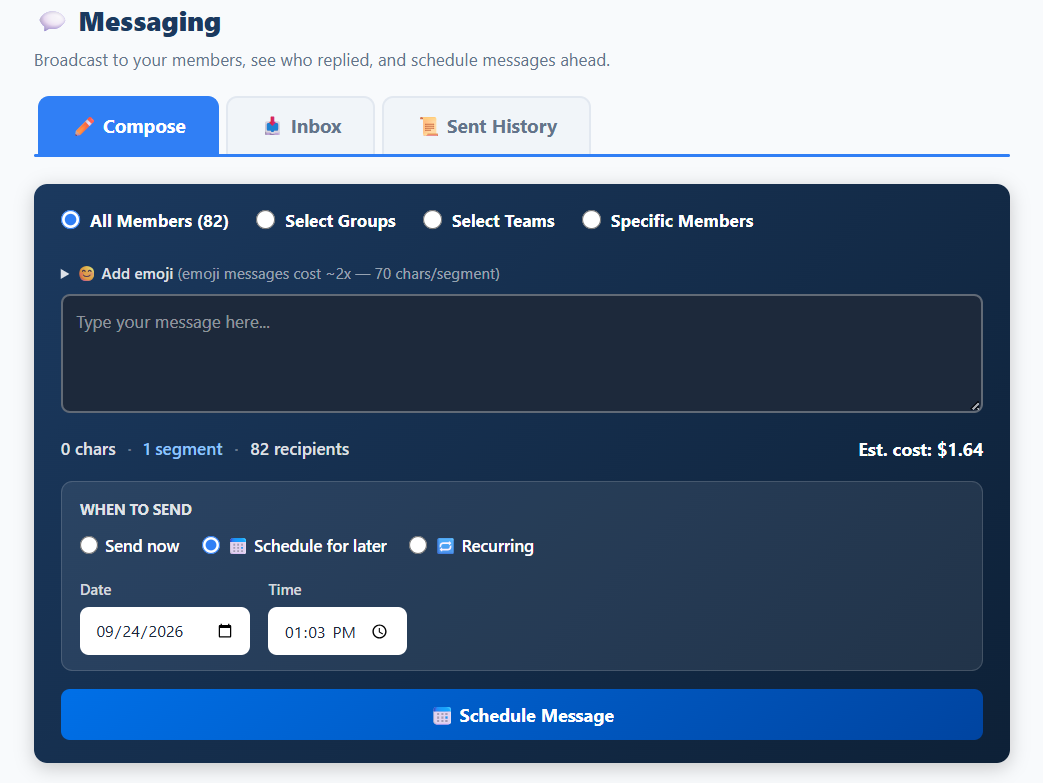
💬 Every reply comes to you — not to everyone
When a member texts back ("Can I bring my daughter?" "Running 10 minutes late"), it lands in your inbox as a clean conversation thread with the message they were replying to right there for context. Reply one-to-one with a tap. Members never get buried in a group chat, and routine YES/NO replies are filtered out automatically — your inbox shows only the messages that actually need you.
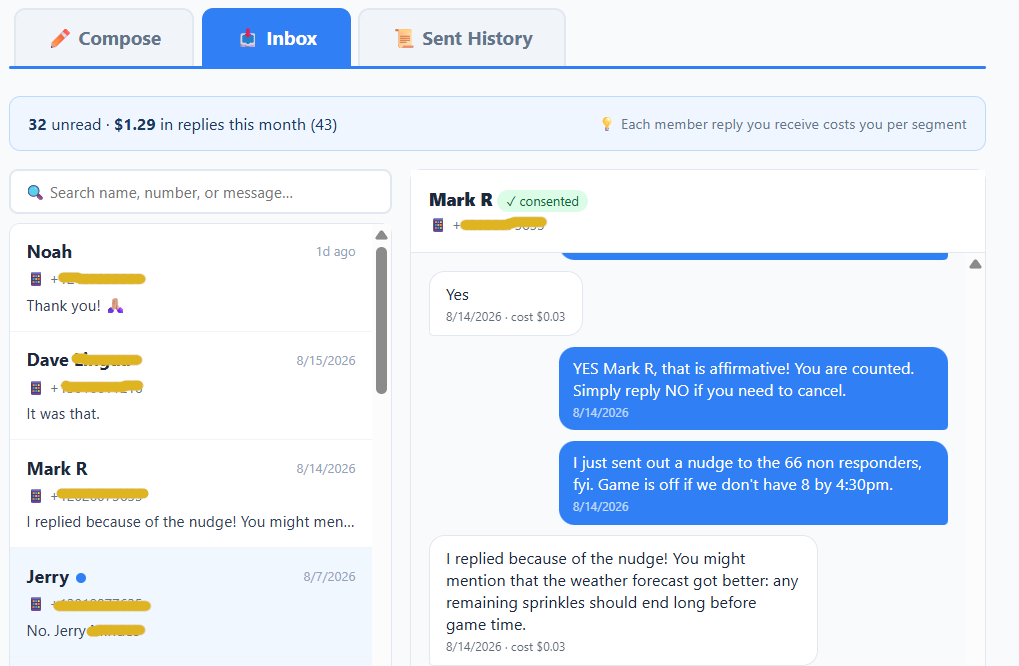
💰 Know the cost before you send
As you write, SMSGO shows the exact cost of your broadcast — recipients × message length × our flat per-text rate — before you hit send. Every campaign and every reply shows its cost to the penny in your history. No credits, no bundles, no math homework.
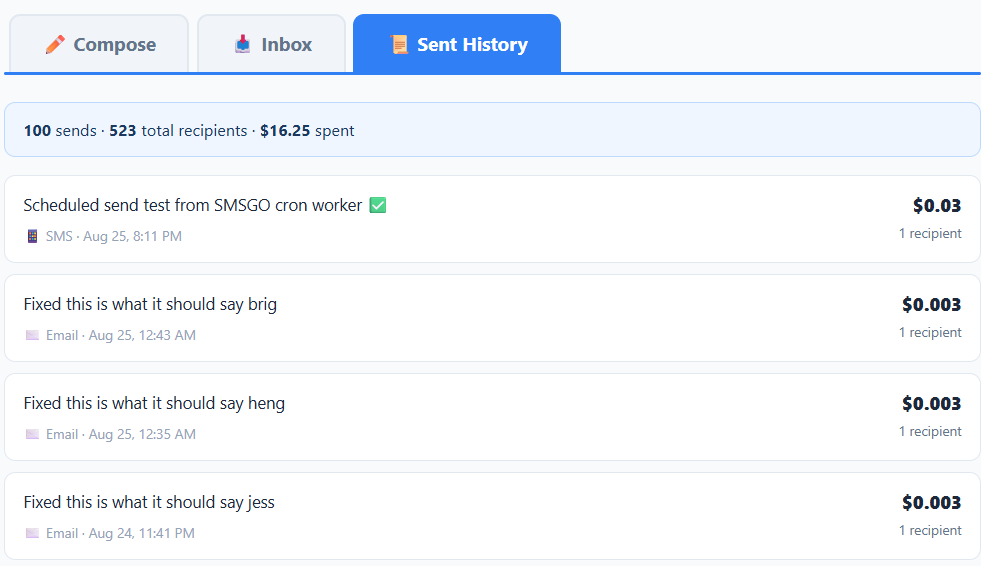
No minimum needed? No problem. Skip the Goal when you create an event and SMSGO simply collects RSVPs and shows you who's coming — perfect for meetings, book clubs, and anything that happens rain or shine.
Anyone can text PAY to chip in.
Group messaging costs pennies per person per month — but covering it shouldn't fall entirely on the organizer. A member texts PAY, gets a Stripe link, contributes any amount, and that goes straight into the group's wallet. Receipt fires by text. Everyone sees who chipped in.
Tap to contribute: smsgo.org/pay/abc123
Group balance: $24.62.
Stripe-powered, dead simple.
- Members text PAY (or CONTRIBUTE or DONATE — same flow)
- Get a unique tokenized Stripe link, $3 minimum, $1000 maximum
- Tap, pay any amount, done — no account needed on Stripe
- Funds added instantly to group wallet on payment success
- Confirmation text back to contributor with new balance
- Organizer gets a notification (configurable per organizer)
- All contributions logged on the dashboard with date, amount, contributor
Text or email — their choice, one count.
Some of your people live in their inbox. Every member can receive by SMS, email, or both — and email invitations arrive with one-tap buttons. No app, no account, no login. Their answer lands in the same headcount as everyone who replied by text. Invitations, nudges, polls, and Best Fit all work both ways.
We need 8 to play.
One event. One count. No one has to move.
You don't run a "text event" or an "email event" — you run an event. SMSGO delivers to each member on their channel and merges every answer into one live tally.
- Per-member channel preference: SMS, email, or both
- Email invites carry one-tap YES / YES +N / STATUS buttons
- Replies from both channels land in the same count, same roster
- Email costs a tenth of a text: $0.003 vs $0.03
- Before you send, the preview shows the split — how many go by text, how many by email, and the total cost
Polls — quick decisions, by text.
Need to settle a question fast? Send a poll. Members reply with a single letter (A, B, C, D…) — or tap a button in the email version. You watch the live tally fill in. Click any name to message that voter directly.
Single-letter reply, live tally.
Polls are how you settle small group decisions without a 47-message group chat. Members reply with the letter. The tally fills as votes arrive.
- 2–10 options per poll
- Single-letter reply: "B" — or one tap in email
- Live response rate, vote counts, leading option highlighted
- Click any voter's name to message them directly (e.g. follow up on a "no" vote)
- Optional: announce results back to the group when polling ends
- Archive when done so it doesn't clutter the dashboard
Best Fit Time and Place — let the engine pick.
For complex scheduling, this is the heavy hitter. Send candidate days, time blocks, and locations. Members rank them by text or email — and share how far they'll travel. The engine surfaces the best date, time, and place based on actual member availability — not your best guess.
Rank-by-text, heat map output.
Members rank candidate days, time blocks, and locations by replying with their preferences. SMSGO aggregates and produces a heat map showing exactly when the most people can come.
- Multi-day candidates (e.g. "next 5 weekdays")
- Multi-time-block (morning, midday, evening, etc.)
- Multi-location (rank field A vs field B vs field C)
- Travel willingness — how far each member will drive (geographic summary)
- Heat map view — quickest visual for "when does everyone agree?"
- One-tap nudge for non-responders
Polls and Best Fit are included.
No tier, no upgrade, no per-feature pricing. The $5 pilot includes everything.
Preview every message before it sends.
Every send path — invitations, nudges, broadcasts, individual messages — runs through the same preview modal. You see the exact text, the recipient list, the text/email split, the segment count, and the cost before anything goes out. No surprises. No accidents. No "wait, I didn't mean to text 107 people."
One preview pattern, every send path.
- Manual nudge — preview before sending
- Send to confirmed attendees — preview before sending
- Broadcast to all members — preview before sending
- Group or team broadcast — preview before sending
- Poll reminders — preview before sending
- Best Fit nudges — preview before sending
Recipient count, text/email split, segment count, and exact cost are computed live — using the same logic that bills the message. What you see is what you'll pay.
Pay-as-you-go. Every cent visible.
No subscription. No monthly fee. No "credits" or "tokens" with weird math. You load your wallet with $5 minimum, SMSGO charges $0.03 per text segment and $0.003 per email, and the wallet drains as you use it. Group goes quiet? You pay nothing.
The whole ledger, all the time.
- Every message logged — sent and received, text and email
- Cost per message, segment count, encoding (GSM-7 or UCS-2)
- Itemized per event (so you know which event cost what)
- Contributions logged with contributor name and date
- Exportable to CSV for your records
- Live balance shown on every page
$5 gets you 166 texts at $0.03 each — and email is a tenth of that at $0.003. For a typical 20–30 person weekly group, that's around 2 weeks of normal activity by text; smaller groups stretch to 3, and leaning on email stretches it much further.
More tools for the person running the group.
Beyond the core mechanics, organizers get a handful of tools that come up often — managing membership, broadcasting, taking notes, and archiving past events.
Tag your roster
Group members into "regulars," "subs," "evening crew," etc. Send invites to specific groups, not everyone.
Two-sided events
Per-team Goals, self-select or assigned rosters, and team-by-team STATUS. Fires only when every side fills.
Remember everything
Free-text notes per event — weather, attendance observations, who flaked, venue feedback. Up to 5,000 chars.
One-off messages
Send anything to anyone — one member, a group, a team, or all. Same preview-and-confirm modal as event invites.
Clean history
One-tap archive when an event is done. Stays searchable, doesn't clutter the active dashboard.
Auto-collect names
If a new member joins without giving their name, SMSGO auto-prompts them at 1h and 24h. Visible badge until done.
Run several at once
Wednesday game + Friday game + Sunday brunch — all running concurrently, each with its own Goal and roster.
Grow the group
Every group gets a join link and QR code. Text it, post it, print it — new members enroll themselves in seconds.
All the keywords members can text.
Members never see a UI. They just text. Here is every keyword they can use, and what each one does. Not case-sensitive — "yes," "Yes," "YES" all work.
Confirm attendance
Confirms you're coming to the event you were just invited to. Add a +N for additional guests (e.g. YES +2).
Decline — or cancel a YES
Declines the event, or cancels a YES you already sent. Frees your spot for the waitlist and updates your team's count on teams events.
Pick your team
On a teams event, after you reply YES the system asks which side. Reply with the digit (e.g. 1 for Dark Shirts).
Check the count
Returns the live confirmed count and the names of who's in — team by team on teams events. Anyone in the group can use it, anytime.
Contribute funds
Returns a Stripe link to chip in toward the group's wallet. Also accepts CONTRIBUTE and DONATE.
Join the group
Adds you to a group. The code is given by the organizer (e.g. JOIN SSU). You always send this yourself.
Update your name
Changes how the system addresses you in messages. Useful if you joined without a name or want to use a nickname.
Get assistance
Returns information about the SMS program and contact info for support.
Leave a single group
Removes you from one specific group but keeps you opted in to other groups you're a member of.
Opt out completely
Removes you from every SMSGO group and stops all messages. Required by SMS compliance. UNSUBSCRIBE does the same.
SMS done by the book.
SMSGO is registered with the carriers, follows the CTIA messaging principles, and complies with the TCPA and the carrier-required A2P 10DLC framework. Your members' numbers are never sold or shared.
Consent
Members always enroll themselves: they text JOIN plus the group code, or use the group's join link or QR code — entering their own number either way. Organizers share the link; they cannot enter a phone number on anyone's behalf. Consent is never a condition of participation in your real-world group.
Opt-out
Replying STOP at any time removes a member from all SMSGO messages immediately. LEAVE removes them from a single group while keeping them opted in elsewhere.
Carrier registration
SMSGO uses A2P 10DLC registered numbers via Twilio for SMS, and Mailgun with an authenticated sending domain for email. Verified RCS Business Messaging — for branded messaging on supported devices — is in carrier review. All messages are delivered through carrier-vetted channels.
Privacy
Phone numbers are stored encrypted at rest and used only to deliver messages on behalf of the organizer they joined. SMSGO does not sell, rent, or share member data for marketing purposes — ever.